Kimi K3.1 Pro (3T Parameters) Released! How to Run the Open-Source MoE Giant on Consumer Hardware via LocModel 2.1.0 (Tiered Offload Guide)
Kimi K3.1 Pro (3T Parameters) Released! How to Run the Open-Source MoE Giant on Consumer Hardware via LocModel 2.1.0 (Tiered Offload Guide)
Moonshot AI has stunned the open-source community by open-sourcing its flagship 3 Trillion parameter native multimodal foundation model. Here is the complete engineering walkthrough to deploy and run it locally using tiered VRAM, RAM, and NVMe SSD paging.
The open-source AI landscape just experienced a monumental shift. In an unexpected overnight release, Moonshot AI officially published the open-source weights for Kimi K3.1 Pro—a flagship, native multimodal agent foundation model featuring an astounding 3 Trillion (3T) parameters.
With weights available directly on Hugging Face, developers and researchers can now inspect, fine-tune, and run this frontier-grade model without relying on closed proprietary API endpoints. Kimi K3.1 Pro demonstrates breakthrough performance in autonomous code generation, 3D physics synthesis, financial analysis, and multi-step agent tool invocation.

Figure 1: Moonshot AI's official release architecture for Kimi K3.1 Pro—a 3T parameter native multimodal foundation model.
1. Core Dependencies & Verified Download Sources
To run this giant locally, bookmark these verified official repositories and download links:
Enterprise Notice: Need certified AI and Machine Learning Specialists to configure custom fine-tunes, deploy private local LLM clusters, or build autonomous agent swarms? Access pre-vetted engineers through the Upwork Enterprise Talent Network.
2. The Breakthrough: Three-Tier Memory Offloading
How does a consumer workstation load a model whose weights dwarf physical GPU VRAM? LocModel 2.1.0 implements a specialized Tiered Paging Pipeline:
- Fast Tier (GPU VRAM): Hosts attention matrices, query-key-value projections, and real-time KV-cache tensors for immediate evaluation.
- Medium Tier (System DDR4/DDR5 RAM): Holds active intermediate transformer blocks and recurrent activations.
- Bulk Tier (NVMe SSD Disk Paging): Infrequently accessed feed-forward network (FFN) layers are paged directly from high-speed PCIe NVMe drives on-demand.

Figure 2: Official Hugging Face repository card for Kimi-K3.1-Pro showing verified weight manifests and architecture tokens.
3. The 4-Step Practical Deployment Pipeline
Step 1: Install LocModel 2.1.0
LocModel provides single-installer binaries for Windows 10/11 x64, macOS (Apple Silicon M1/M2/M3/M4), and Linux distributions:
- Download the installer from https://locmodel.com.
- Run setup with administrative privileges to enable extended virtual memory paging.
- LocModel initializes a lightweight local control dashboard at
http://127.0.0.1:8080.

Figure 3: LocModel 2.1.0's hardware profiling dashboard auto-detecting GPU architecture and configuring inference runtimes.
Step 2: Automated Hardware Profiling & llama.cpp Engine Setup
Upon launch, LocModel detects your compute capabilities (NVIDIA CUDA, Apple Metal, or Vulkan) and auto-installs the matched, instruction-optimized llama.cpp backend.
Within the Hardware Configuration settings, toggle Tiered Memory Offload and set your primary NVMe SSD path as the paging scratch disk.

Figure 4: LocModel layer offload configuration distributing parameters across GPU VRAM, physical RAM, and NVMe SSD scratch storage.
Step 3: Model Ingestion (Hugging Face or Quantized GGUF)
You can either download the weights directly via LocModel's integrated search, or manually import the Unsloth Kimi K3 GGUF quantized checkpoints (e.g., Q4_K_M for balanced perplexity or Q2_K for 8GB VRAM cards).
Step 4: Launching Inference & Prompt Execution
Once loaded, navigate to the Playground. Set context length to 32,768 tokens and begin executing prompt tests. Prompt ingestion benefits from GPU compute, while token generation streams steadily from memory.
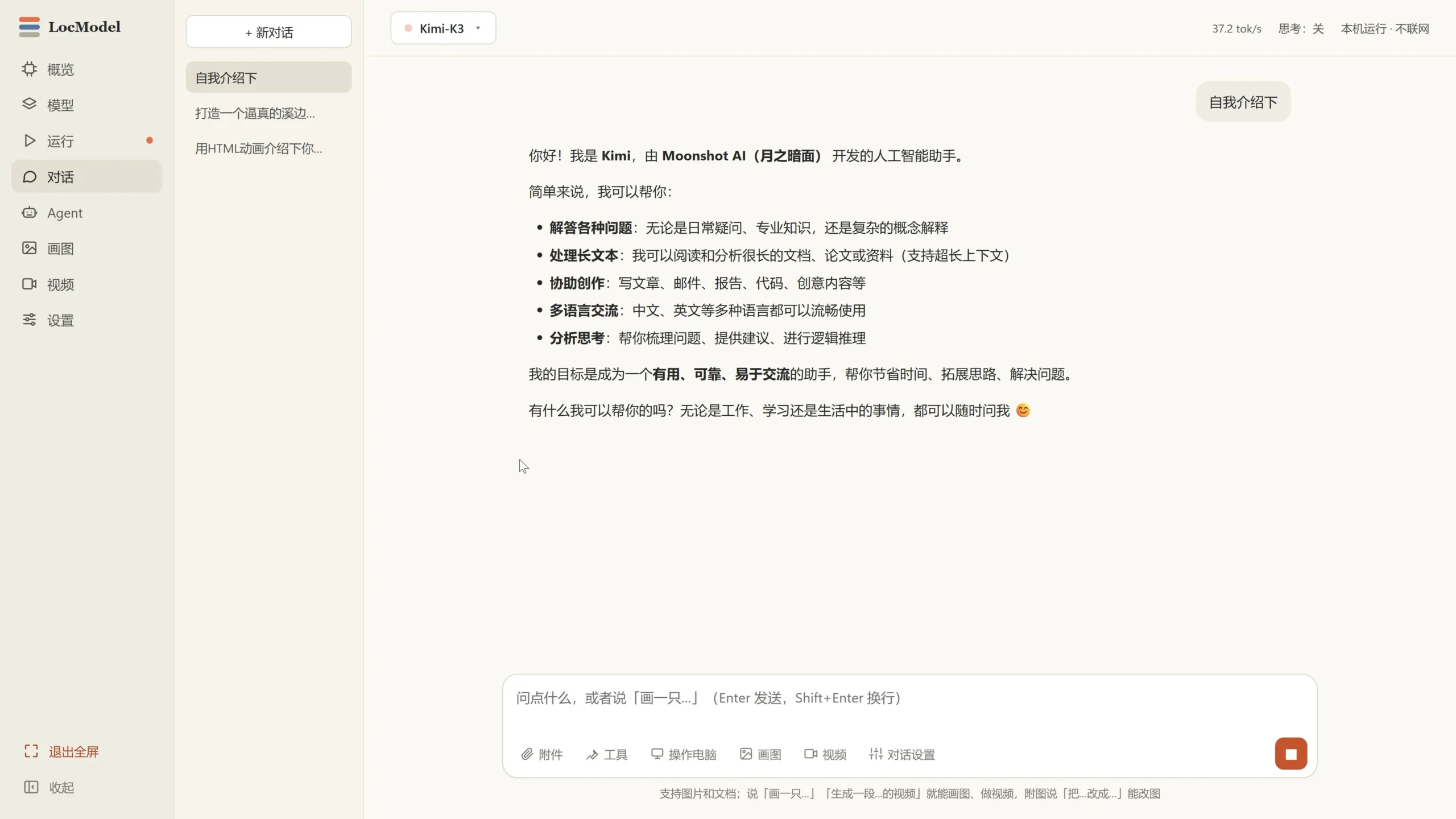
Figure 5: Live prompt evaluation of Kimi K3 running locally, monitoring token latency and memory paging bandwidth.
4. Verified Showcases: 3D Web Apps Synthesized by Kimi
Kimi K3.1 Pro's native agent capabilities shine in complex, full-stack software synthesis. Here are three verified web applications synthesized entirely by Kimi from natural language prompts:
Showcase A: Club No.9 3D Billiards (Three.js + Rapier Physics)
A complete first-person 3D billiards web game with cue friction, ball collision equations, and orbit camera controls. Open Live Web App →

Figure 6: Club No.9 3D Billiards web game running Three.js rendering and Rapier physics synthesized zero-shot by Kimi.
Showcase B: Cirrus Reach Sci-Fi Action FPS
A 3D sci-fi action shooter with three waves of defensive drones, weapon recoil, and turbine activation logic. Open Live Canvas →
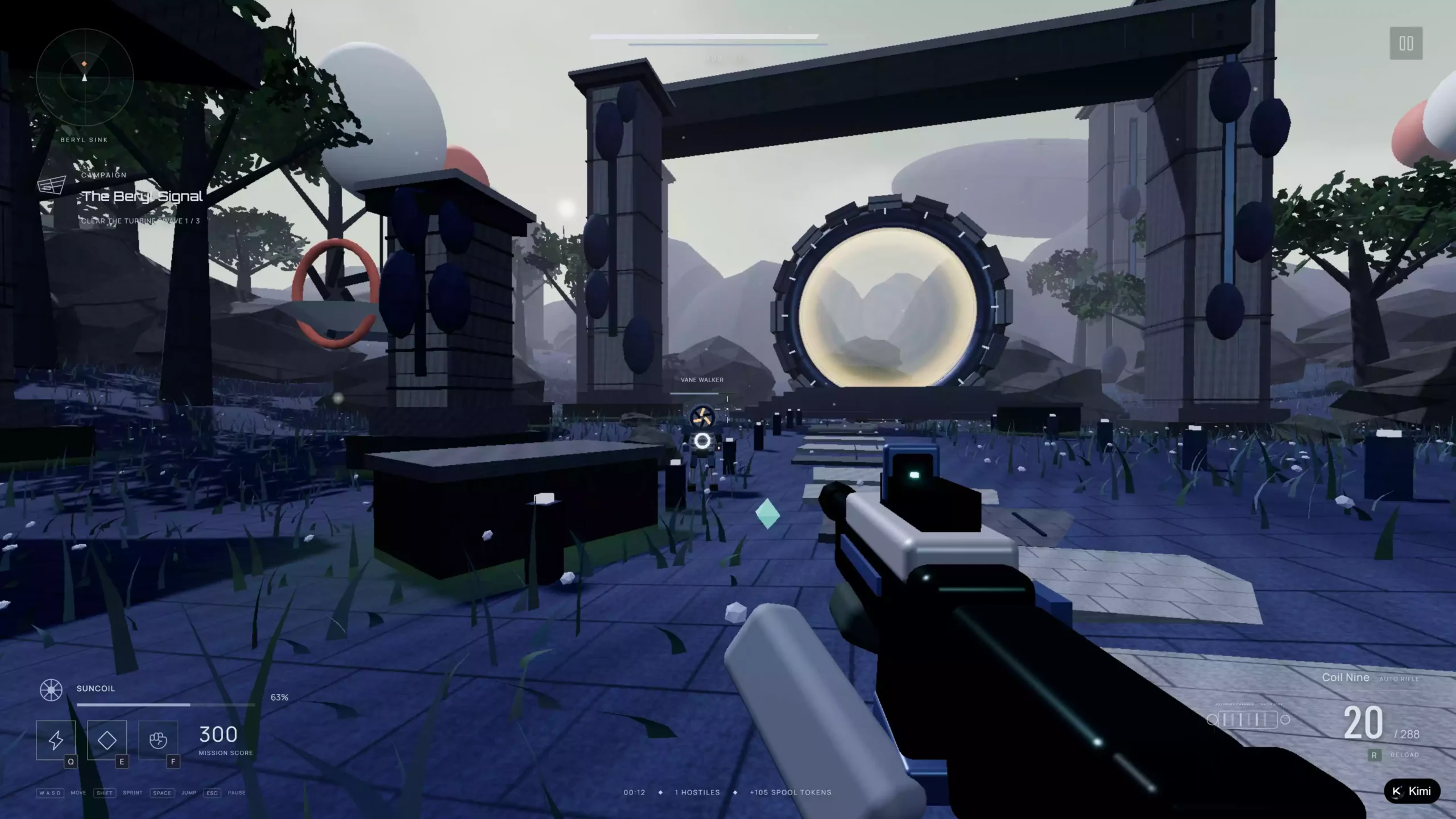
Figure 7: In-browser 3D action shooter featuring particle lighting and enemy state machine architecture generated by Kimi.
Showcase C: Port Morrow Open-World Driving Simulator
An open-world courier vehicle simulation with handbrake physics, vehicle health meters, and radio audio loops. Open Live Driving Sim →

Figure 8: Open-world driving simulation synthesized with suspension physics and dynamic camera view switching.
5. Summary & Next Steps
The open-sourcing of Kimi K3.1 Pro marks a breakthrough in frontier machine learning. With 3 Trillion parameters publicly available and LocModel 2.1.0 lowering the deployment threshold through tiered offloading, developers can now explore enterprise-grade reasoning on local hardware.
To automate multi-agent workflows, connect your local model's API endpoint to Make.com to orchestrate 24/7 web intelligence, code analysis, and automated customer routing.
Accelerate Your AI Engineering Deployment
Building high-performance multi-agent architectures or deploying fine-tuned LLM models into production? Partner with expert developers on Upwork.
Hire Vetted AI Engineers on Upwork


评论
发表评论